Set Up Transfer to Myself
With Transfer to Myself, mobile users can submit incomplete TrueContext Teamwork TrueContext Teamwork is a feature that enables mobile users to transfer incomplete forms for other users to complete as part of a multi-user workflow. This can be useful for jobs that require someone else's expertise or that span multiple shifts.-enabled forms while keeping the record assigned to them. They transfer the form and select Myself. This makes the incomplete record visible to supervisors in the TrueContext Web Portal The TrueContext Web Portal is a web application used to manage security settings, forms, FormSpaces, other users, Data Sources, and Data Destinations.. It also triggers Data Destinations A Data Destination specifies where to send data from a submitted form. You can use Data Destinations to automate data sharing and storage, routing data to a specific service (such as email or cloud storage) in several different formats. set to execute for incomplete records.
Available on the Intelligent and Elite tiers:
Contents
Prerequisites
-
You must be an Admin user or a User with Can Create FormSpace
FormSpaces are where forms are stored and organized in the TrueContext Web Portal. A TrueContext Team may have multiple FormSpaces, depending on their needs. Admins can set FormSpace permissions to control which users have access to the forms in that FormSpace. permissions. -
Your users must have the Mobile App version 25.2 or later.
Steps to set up Transfer to Myself
-
From the Forms & Integrations menu, navigate to the form you want to configure.
-
Select Edit Form.
-
Select Settings, and then select the Workflow Settings.
-
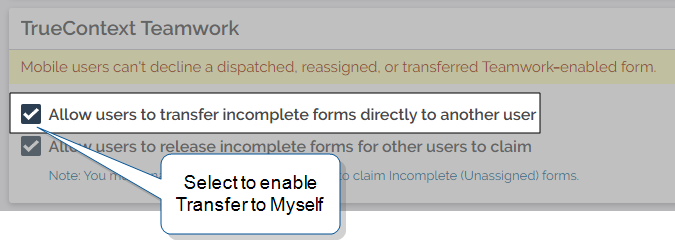
In the TrueContext Teamwork section, select the option Allow users to transfer incomplete forms directly to another user.
-
SAVE AND DEPLOY your form when you’re ready to make it available to your users.