How TrueContext Teamwork Works
TrueContext Teamwork TrueContext Teamwork is a feature that enables mobile users to transfer incomplete forms for other users to complete as part of a multi-user workflow. This can be useful for jobs that require someone else's expertise or that span multiple shifts. enables more than one member of your team to work on a form. Users can transfer incomplete forms directly to other users who have access to the form. They can also submit incomplete forms for other users to claim or supervisors to Assigning and reassigning control which users are responsible for dispatched records, Started records that have a draft, and incomplete TrueContext Teamwork records. A dispatcher with the "Can Manage Assignments" FormSpace permission can assign or reassign a record, and field users can claim unassigned records from the Group Inbox. Supervisors can reassign an incomplete TrueContext Teamwork record to another user or to the FormSpace, even if a user already has it.. This topic describes in detail how a TrueContext Teamwork-enabled form moves through a workflow.
Available on the Intelligent and Elite tiers:
How a TrueContext Teamwork-enabled form moves through a workflow
The following diagram shows the different options that you have to move a TrueContext Teamwork-enabled form through a workflow.
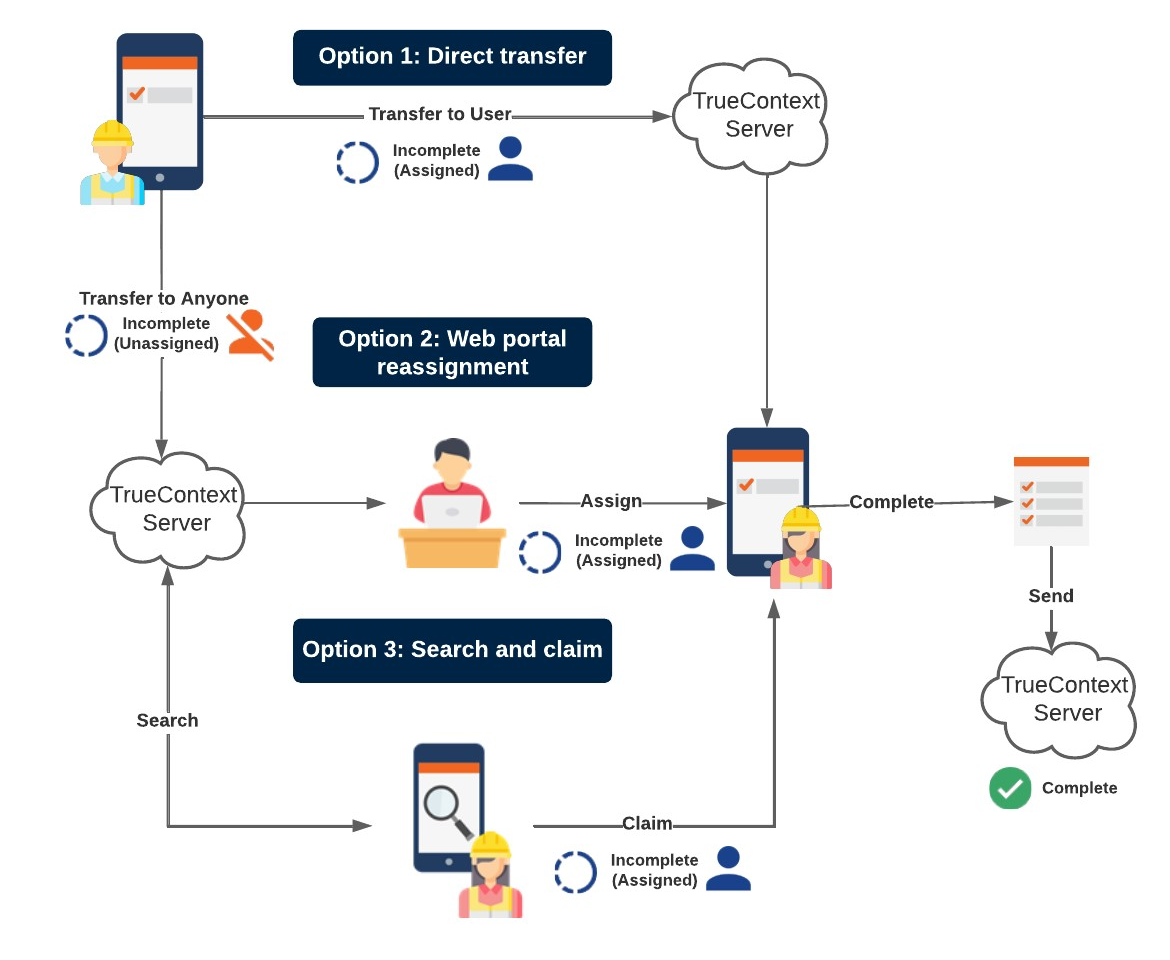
- Option 1: Direct transfer
-
-
User 1 partially completes a form and directly transfers it to User 2.
Form Submission Status: Incomplete (Assigned)
-
User 2 completes and sends the form.
Form Submission Status: Complete
-
- Option 2: Web Portal assignment
-
-
User 1 partially completes a form and submits it as incomplete.
Form Submission Status: Incomplete (Unassigned)
-
In the Web Portal, the supervisor reassigns the form to User 2.
Form Submission Status: Incomplete (Assigned)
-
User 2 completes and sends the form.
Form Submission Status: Complete
-
- Option 3: Search and claim
-
-
User 1 partially completes a form and submits it as incomplete.
Form Submission Status: Incomplete (Unassigned)
-
User 2 searches for and claims the incomplete form.
Form Submission Status: Incomplete (Assigned)
-
User 2 completes and sends the form.
Form Submission Status: Complete
-
Detailed TrueContext Teamwork workflow
-
There are two ways that a mobile user can start work on a TrueContext Teamwork-enabled form.
-
The mobile user opens a form from their Inbox that a supervisor or team lead dispatched.
-
The mobile user opens a form from the Forms tab in the Mobile App.
-
-
If the technician can’t complete the work themselves, they “transfer” the incomplete form. The technician typically transfers a form when
-
the work requires the skills of a different team member with specific knowledge or experience
-
the work isn’t complete when the first technician’s shift ends, or
-
the work requires a return visit to the site after a period of days, weeks, or months.
-
-
The technician can either
-
transfer the incomplete form for other users to claim or supervisors to
-
transfer the incomplete form directly to another user. The status of the form changes to Incomplete (Assigned).
-
-
In the Web Portal, the supervisor can see incomplete forms identified as Incomplete (Unassigned) or Incomplete (Assigned). The supervisor can also see which questions were answered and which user answered them.
-
For Incomplete (Unassigned) forms, the supervisor can either
-
leave the form unassigned for the next available technician to claim, or
-
-
-
In some cases, the supervisor might want to reassign
Assigning and reassigning control which users are responsible for dispatched records, Started records that have a draft, and incomplete TrueContext Teamwork records. A dispatcher with the "Can Manage Assignments" FormSpace permission can assign or reassign a record, and field users can claim unassigned records from the Group Inbox. Supervisors can reassign an incomplete TrueContext Teamwork record to another user or to the FormSpace, even if a user already has it. a form. For example, if a team member is unexpectedly out sick, the supervisor can reassign the form to another technician. The supervisor can also reassign the form to the FormSpace FormSpaces are where forms are stored and organized in the TrueContext Web Portal. A TrueContext Team may have multiple FormSpaces, depending on their needs. Admins can set FormSpace permissions to control which users have access to the forms in that FormSpace. for the next available technician to claim.Note:The last uploaded draft from the assignee stays with the record. Any unsaved or unuploaded edits on their device are lost.
-
The form can be reassigned, transferred, and claimed as many times as required to complete the work.
-
The team member who completes the form “Sends” it. In the Web Portal, the supervisor sees the form identified as Complete.
-
The supervisor can check the answers and, if they notice an error, they can send the completed form for editing. The mobile device user can either send or transfer the edited form.